Open to work · Remote from Marikina, PH

Gray-Jan TupasAI Automation & Operations Specialist

I turn repetitive business work into systems that run themselves, and I'm honest about where the automation stops.

gray-jan.tupas
Gray-Jan A. Tupas, smiling, in a barong.
  1. Map the process before automating it
  2. Keep a human on consequential calls
  3. Test node by node, document what broke
Systems shipped
6
n8n workflows
8
Ops docs & SOPs written
37pp
Active client operations
1

Now building

  • Feature work on a courier client's website
  • Expanding the AI workspace
  • AI-Powered Product Development studies at MMDC

More n8n builds

Seven more workflows, from lead cleanup to video. Open any canvas to see it full size.

BUILD 02
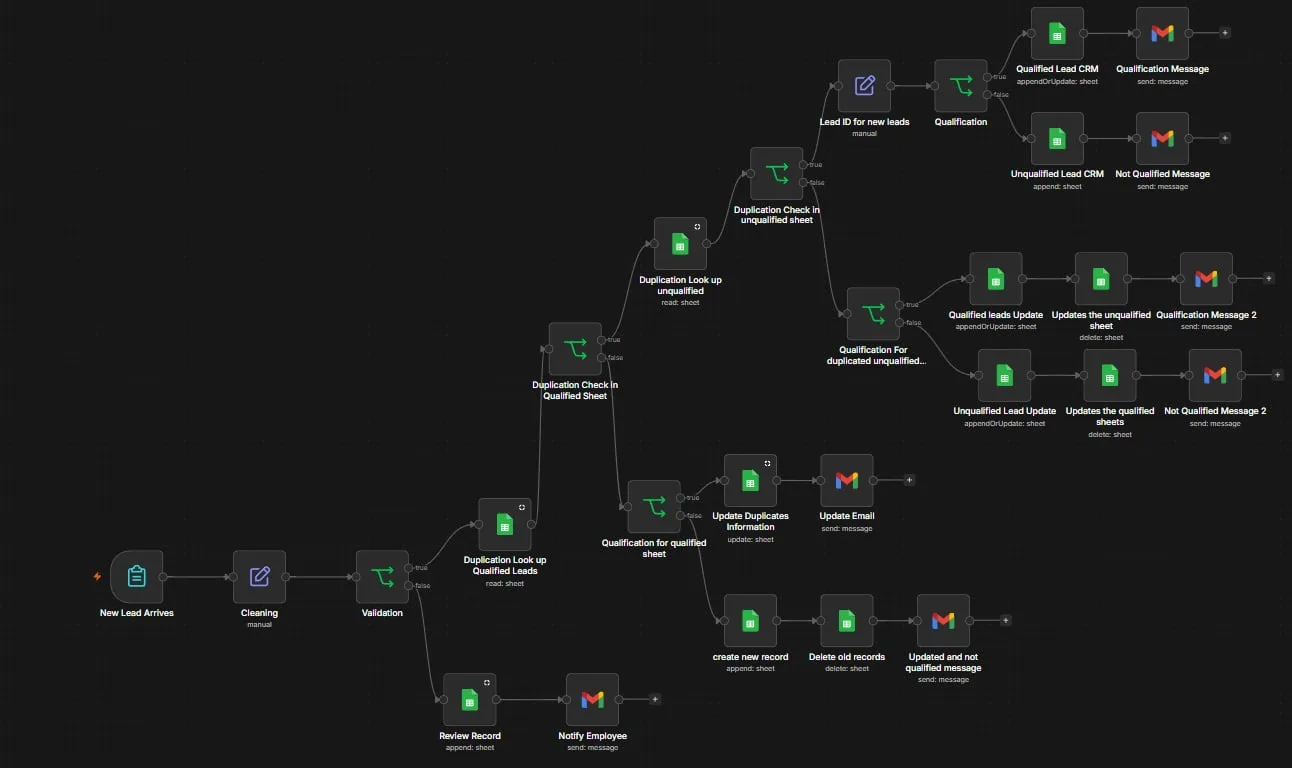
n8n canvas: New Lead Arrives triggers cleaning and validation, which splits to a manual review queue or to duplicate lookups against the qualified and unqualified sheets, then branches through qualification into CRM writes, sheet updates and Gmail notifications.

Intelligent CRM Lead Processing & Deduplication

Cleans and validates every incoming lead, then matches it against both the qualified and unqualified sheets on name, email and phone, not a single field, before deciding whether to update, create, or move the record.

  • n8n
  • Google Sheets
  • Gmail
  • JavaScript
How it works

Problem. A single-field duplicate check let the same person enter the CRM three times under a typo'd email, and when a lead's qualification changed, the stale row stayed behind in the wrong sheet.

Solution. Matches on name, email and phone across both sheets, resolves each hit to a stable Lead ID, updates in place instead of appending, and moves the record between sheets when status changes.

The problem
Single-field duplicate checks let the same person enter the CRM three times under a typo'd email. Qualification changes left stale rows in the wrong sheet.
What it does
  • Cleans and validates the submission, routing incomplete records to a manual review queue with an assigned employee.
  • Multi-field duplicate detection across both the qualified and unqualified databases.
  • Resolves matches against a stable Lead ID, then updates the existing record instead of appending a new one.
  • Moves a lead between sheets when its qualification status changes, deleting the stale row.
  • Sends the correct Gmail notification for each outcome: accepted, rejected, updated, or needs review.
Deliberate edge case
Conflicting email and phone matches route to a human rather than guessing. Next iteration adds structured logging and error handling.
BUILD 03
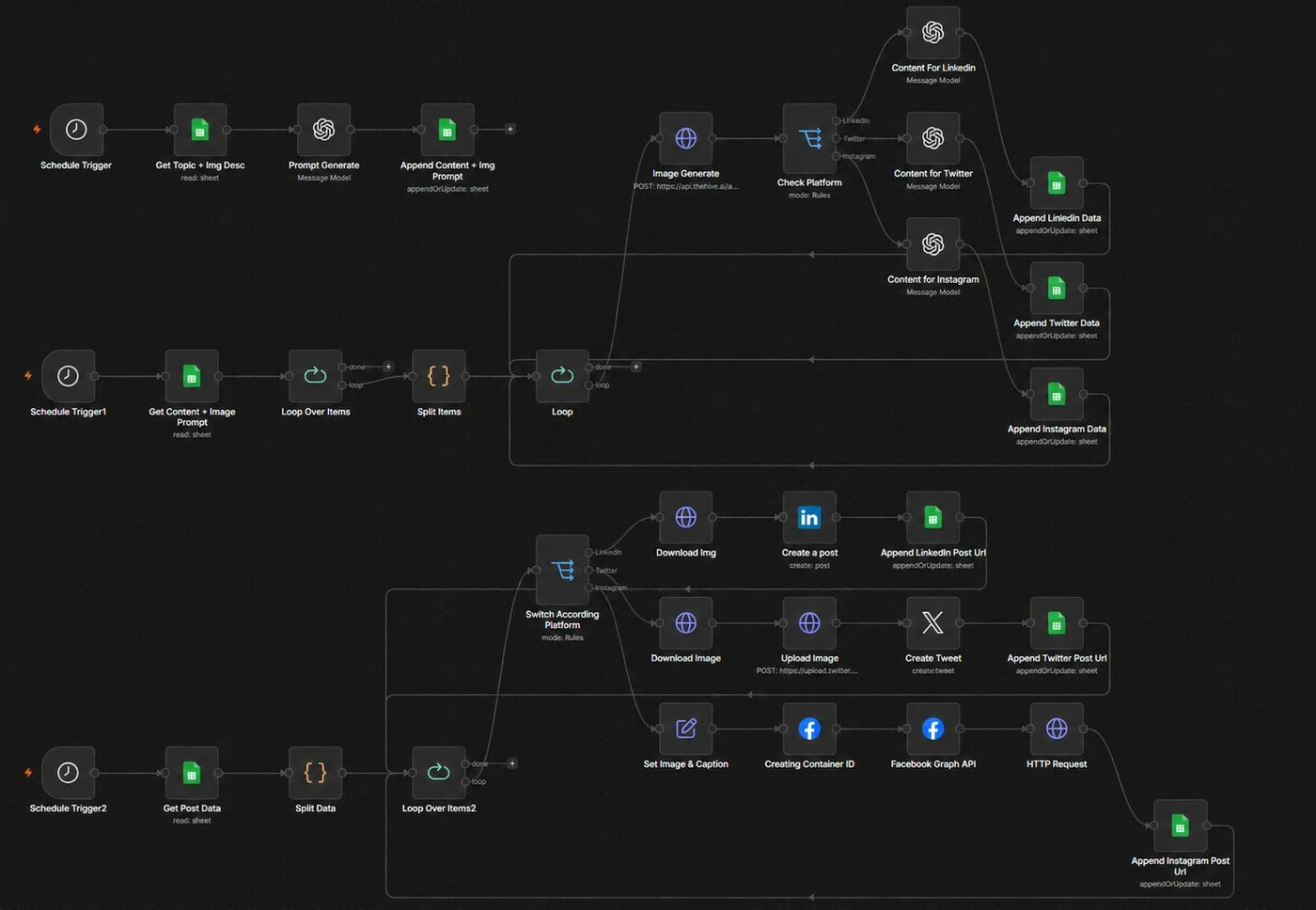
n8n canvas showing three scheduled stages stacked vertically: topic and prompt generation into a content sheet, then a loop that generates images and writes platform-specific copy for LinkedIn, X and Instagram, then a publishing stage that switches by platform through LinkedIn, X and the Facebook Graph API and appends each post URL.

AI-Powered Multi-Platform Content Engine

A three-stage engine that generates, prepares, publishes and tracks social content across LinkedIn, X, Facebook and Instagram.

  • n8n
  • OpenAI
  • Google Sheets
  • LinkedIn
How it works

Problem. Publishing to four platforms meant writing one caption and pasting it everywhere, posting by hand on schedule, and keeping no record of what actually went live.

Solution. Generates copy adapted to each platform, publishes on schedule through the right API, including Instagram's two-step container flow, and writes the live post URL back so the output stays auditable.

Architecture
  • Stage 1, generate: pulls topics and creative direction from Sheets, has AI write the image prompt and platform-specific captions, writes them back to a central content database.
  • Stage 2, prepare: loops the queue, generates the image, and branches on platform to produce LinkedIn, X and Instagram variants.
  • Stage 3, publish: a scheduled run routes each post to the right API, including Instagram's two-step container flow through the Facebook Graph API, and logs the live post URL.
Why the post URL matters
Writing the resulting URL back to the sheet turns a fire-and-forget publisher into something you can audit and report on later.
BUILD 04
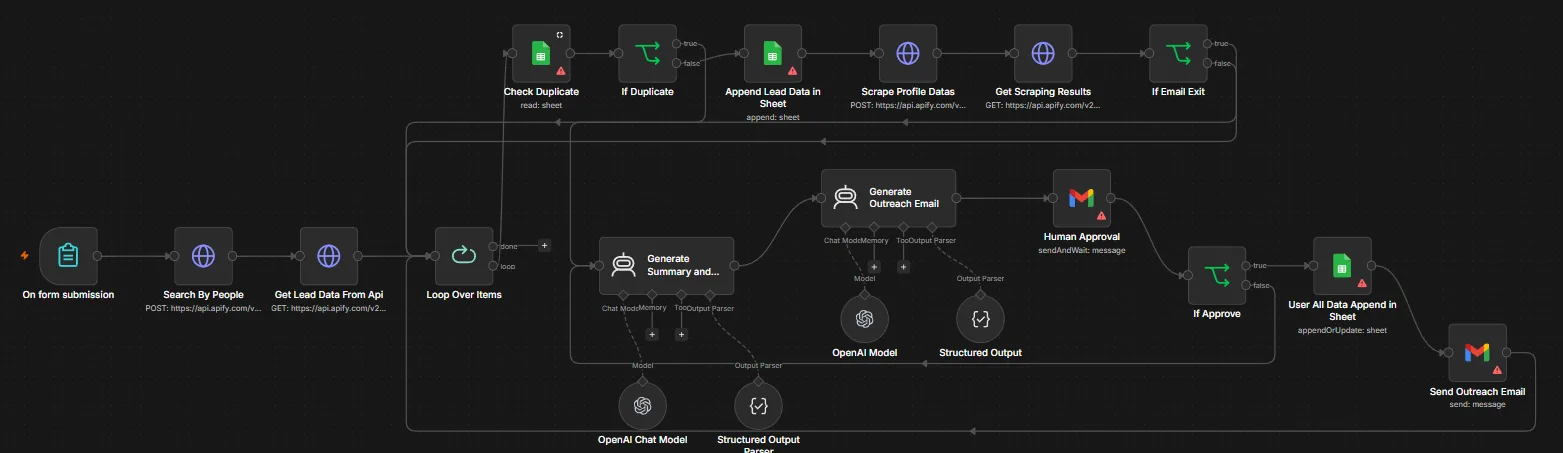
n8n canvas: a form submission triggers Apify people-search and lead-data requests, then a loop runs each prospect through a sheet duplicate check, profile scraping and an email-exists check. Two AI agents, each with an OpenAI chat model and a structured output parser, generate a research summary and an outreach email, which a Gmail send-and-wait Human Approval node gates before the data is appended to a sheet and the email sent.

Human-in-the-Loop AI Outreach System

Researches prospects through Apify, enriches their profiles, and drafts personalised outreach with two chained AI agents, then stops.

  • n8n
  • OpenAI
  • Apify
  • Structured output
How it works

Problem. AI-written cold outreach sends fastest in exactly the place where one hallucinated detail about a prospect costs you the relationship permanently.

Solution. A Gmail send-and-wait node halts the execution and emails the draft to a reviewer. The workflow cannot continue until they reply. The approval is a blocking step, not a courtesy copy.

Flow
  • Prospect criteria arrive through a form, then two Apify calls, a people search and a lead-data fetch, return candidates.
  • Each prospect loops through a sheet duplicate check, profile scraping, and an email-exists check before anything is written.
  • Two chained AI agents, each with an OpenAI chat model and a structured-output parser, produce a research summary and then a customised outreach email from it.
  • A Gmail send-and-wait node emails the draft to a reviewer and blocks the execution until they reply. Only on approval does the row get appended and the outreach sent.
Why the gate
Personalised cold outreach is exactly where a hallucinated detail costs you the relationship. Using send-and-wait rather than a fire-and-forget notification means the workflow physically cannot proceed without a human decision. The approval is a blocking step, not a courtesy copy.
BUILD 05
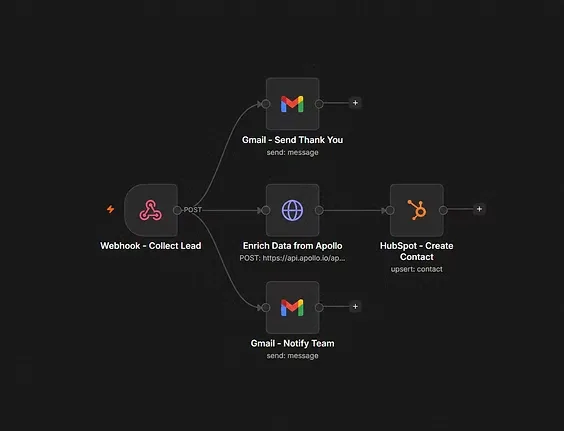
n8n canvas: a Collect Lead webhook fans out in parallel to a Gmail thank-you message, an Apollo enrichment HTTP request, and a Gmail team notification, with the enrichment branch feeding a HubSpot upsert-contact node.

Automated Lead Capture, Enrichment & CRM Sync

A webhook-triggered intake that does three things in parallel the second a lead submits: confirms to the lead, alerts the team, and enriches the record through Apollo before upserting it into HubSpot.

  • n8n
  • Webhooks
  • Apollo
  • HubSpot
How it works

Problem. Between "someone filled in the form" and "sales has a usable record" sat manual data entry, and the lead waited for a reply while their interest cooled.

Solution. The confirmation and team alert fire instantly while Apollo enrichment runs on its own branch, so a slow lookup never delays the human-facing reply. HubSpot upserts, so returning leads update in place.

What it removes
The gap between "someone filled in the form" and "sales has a complete CRM record." No one retypes company data, and the lead gets a confirmation while their interest is still warm.
Design note
Confirmation and team notification fire immediately rather than waiting on enrichment, so a slow or failed Apollo lookup never delays the human-facing response. HubSpot uses upsert, not create, so a returning lead updates in place.
BUILD 06
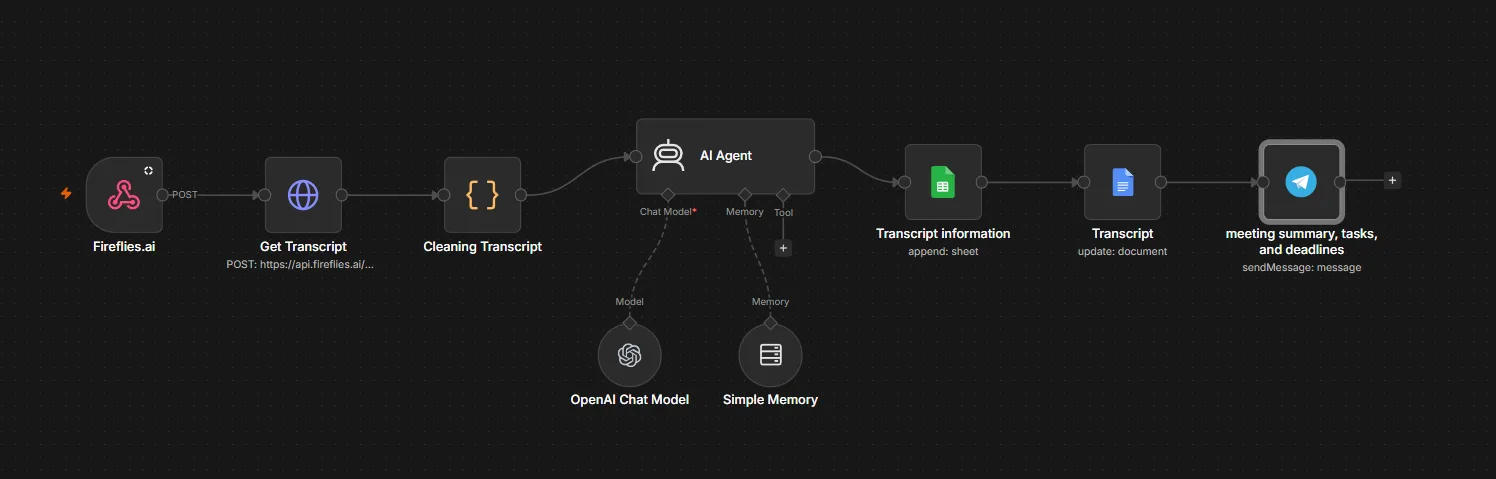
n8n canvas: a Fireflies.ai webhook feeds an HTTP Get Transcript request and a Cleaning Transcript code node into an AI Agent with an OpenAI chat model and simple memory attached, which then appends transcript information to a Google Sheet, updates a Google Doc, and sends the meeting summary, tasks and deadlines to Telegram.

AI Meeting Intelligence & Transcript Management

Fireflies fires a webhook the moment a meeting ends.

  • n8n
  • Fireflies.ai
  • OpenAI
  • Google Sheets
How it works

Problem. Commitments made out loud in a meeting stayed buried in a long transcript nobody re-read, so deadlines and owners were reconstructed from memory afterwards.

Solution. The moment a meeting ends, a webhook drives extraction of the summary, highlights, assigned tasks and deadlines, logged to Sheets, archived in Docs, and pushed to Telegram while it still matters.

Flow
  • Fireflies webhook → HTTP transcript retrieval → JavaScript cleaning and payload normalisation.
  • An AI agent with a chat model and simple memory extracts meeting metadata, summary, highlights, tasks and deadlines.
  • Structured meeting data appends to Google Sheets; the full transcript updates a Google Doc; the summary and action items land in Telegram.
What I hit and fixed
Test-versus-production webhook URLs, payload shape drift between test and real events, and AI-node credit limits. I validated each node independently, corrected the event path, and kept building against a mocked structured output rather than claiming a clean end-to-end deploy.
BUILD 07
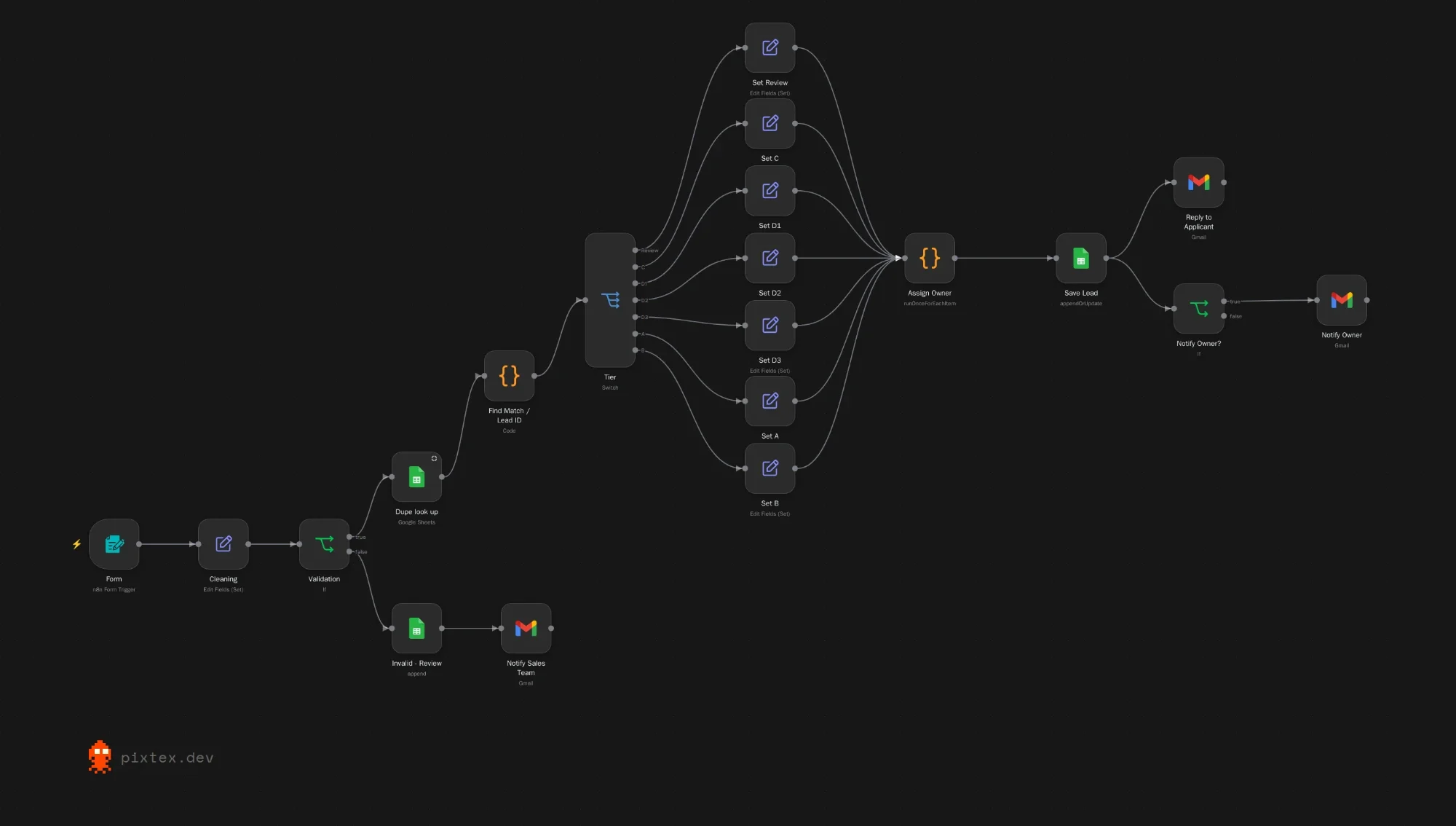
n8n canvas: a form trigger feeds cleaning and validation. Valid submissions go through a duplicate lookup and a lead ID match, then a switch sorts them into tiers, an owner is assigned, the lead is saved to a sheet, the applicant gets a reply and the owner is notified. Invalid submissions are appended to a review sheet and the sales team is notified.

Wholesale Lead Intake

A wholesale application form feeds this workflow.

  • n8n
  • n8n Form
  • Google Sheets
  • Gmail
How it works

A wholesale application form feeds this workflow. It cleans and validates each submission, checks for duplicates, sorts the applicant into a tier, assigns an owner, saves the lead, replies to the applicant and notifies the owner. Invalid submissions go to a review sheet and the sales team is notified.

BUILD 08
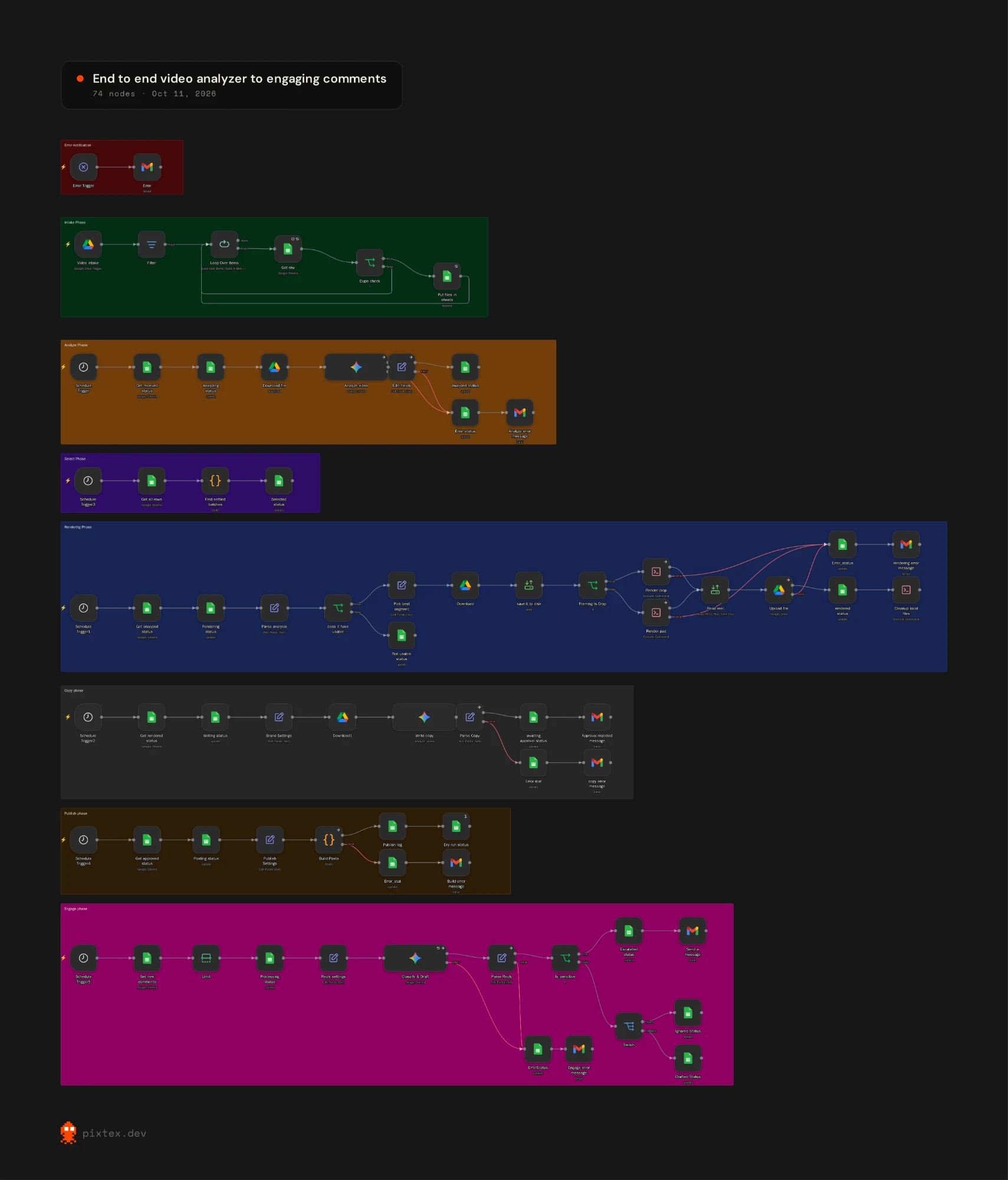
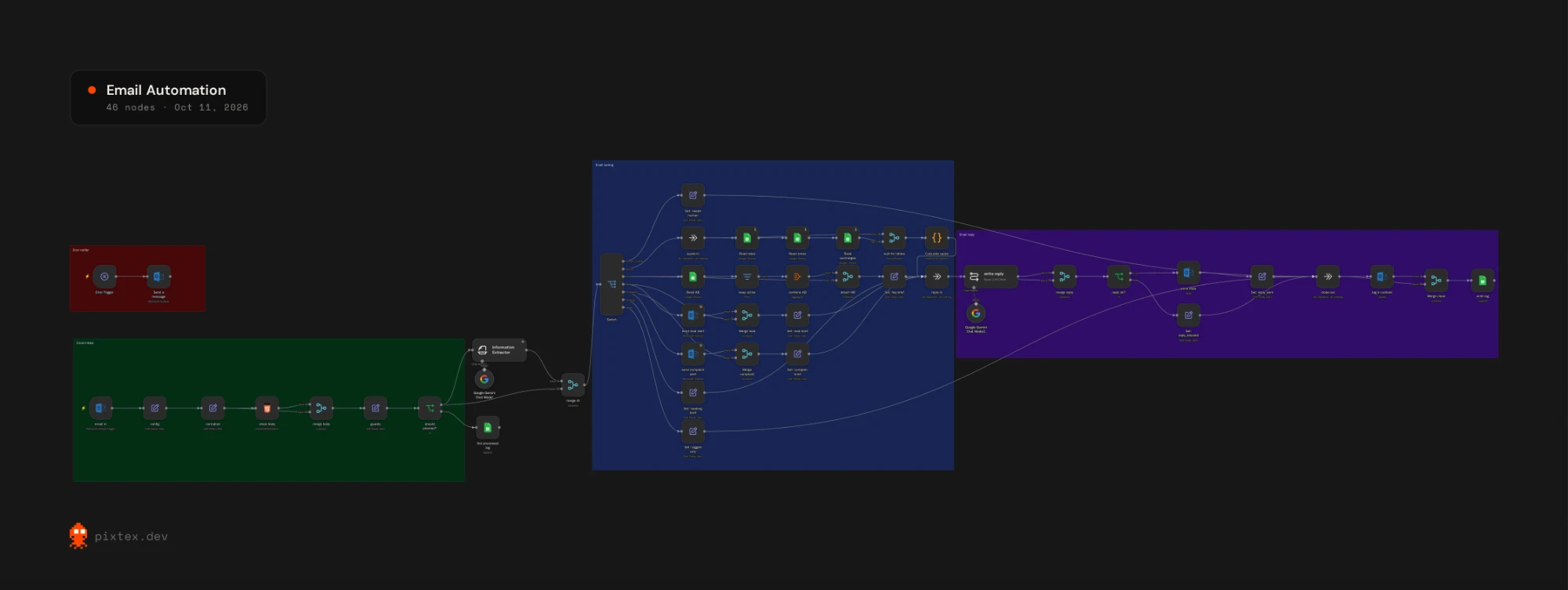
n8n canvas in eight labelled groups: error notification, intake from Google Drive, analyze, select, rendering, copy, publish and engage. Each group starts from its own trigger and records its status in a Google Sheet.

End-to-End Video Analyzer to Engaging Comments

A seven-phase pipeline for short video.

  • n8n
  • Google Drive
  • Google Sheets
  • Gmail
How it works

A seven-phase pipeline for short video. It takes in videos from Google Drive, has AI analyse them, selects and renders the best segment, writes the copy and waits for approval, builds the posts, then classifies new comments and drafts replies, escalating the sensitive ones to a person.

AI-assisted workflows I ran day to day

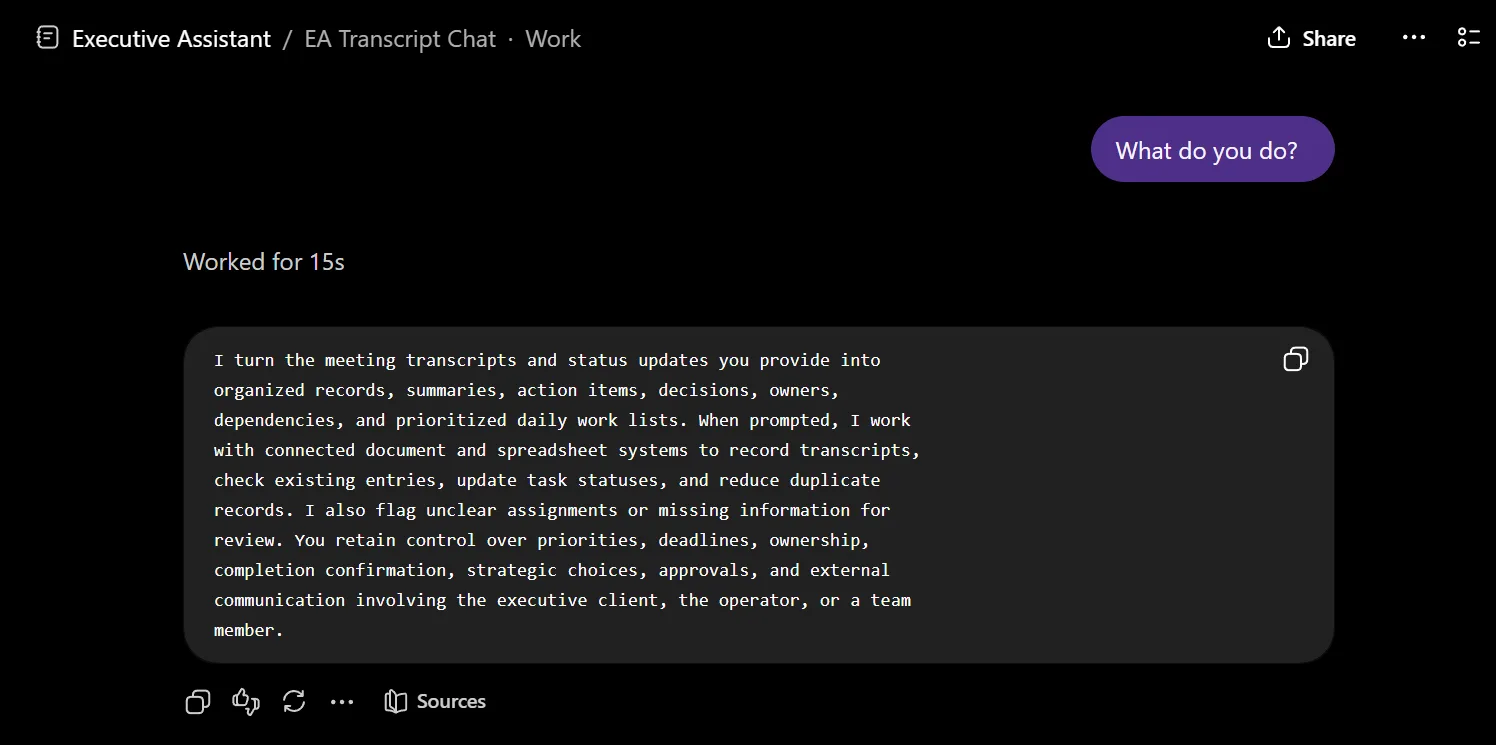
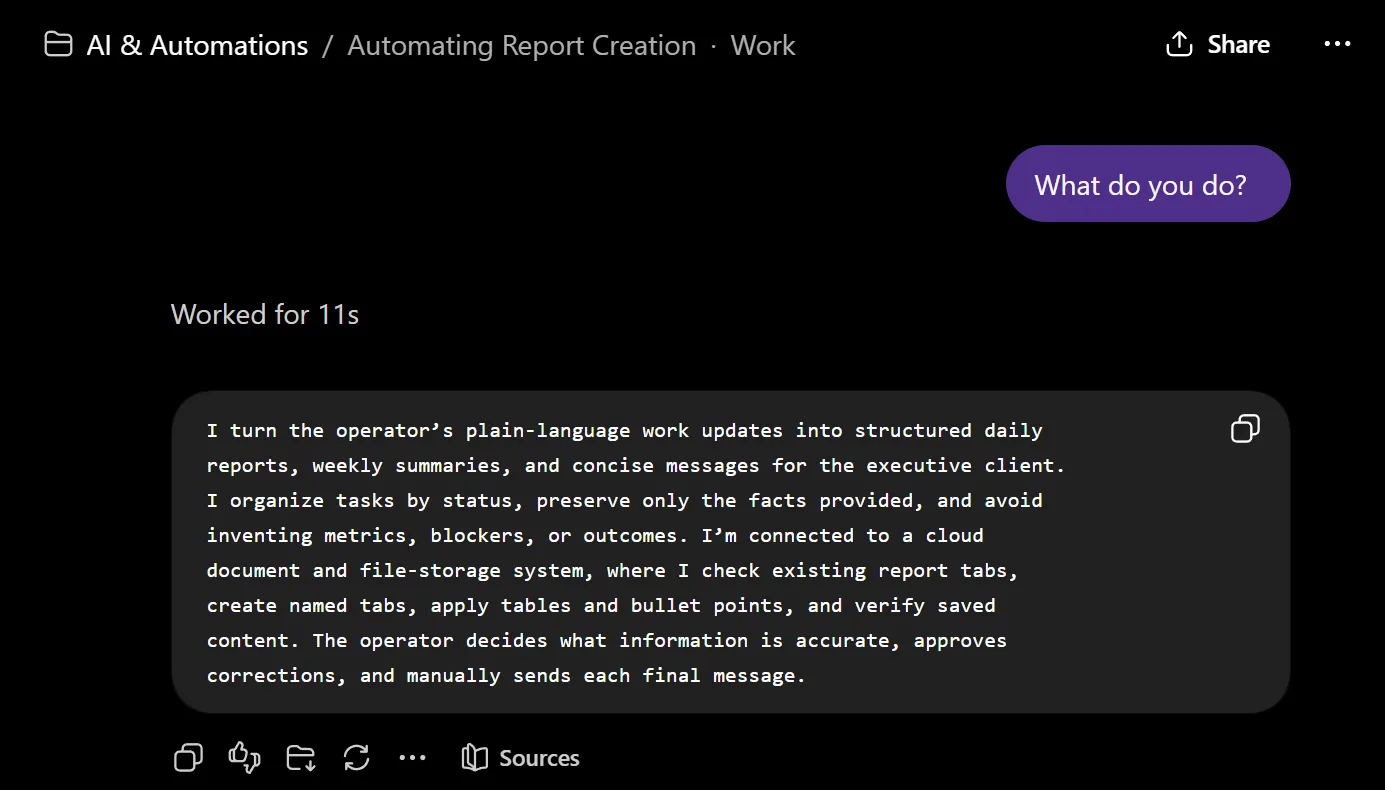
These aren't node graphs. They're conversational systems I designed, wrote the operating instructions for, and ran in production for a live executive operation. Rather than describe them for you, I asked each one what it does; the replies are shown unedited, sanitised only of client detail. Note how consistently they name what they don't do.

Screenshot of the assistant answering the question 'What do you do?' It explains that it turns supplied meeting transcripts and status updates into organised records, summaries, action items, decisions, owners, dependencies and prioritised daily work lists, and that the operator retains control over priorities, deadlines, ownership, completion confirmation, approvals and external communication.

Meeting-to-Execution Operations System

Converts a meeting transcript into a cleaned, speaker-separated record, structured action items with owners and due dates, decisions, dependencies, and a prioritised list of what actually has to happen today.

Boundary. Human-initiated. The Fireflies-to-n8n ingestion path is a tested prototype; the AI node ran on mocked structured output under credit limits, and writeback is prompted, not unattended.

Screenshot of the assistant answering 'What do you do?' It explains that it turns the operator's plain-language work updates into structured daily reports, weekly summaries and concise executive messages, organises tasks by status, preserves only the facts provided and avoids inventing metrics, blockers or outcomes, while the operator decides what is accurate and manually sends each final message.

Daily & Weekly Reporting Workflow

Turns a short list of plain-language work notes into a structured daily report, a weekly consolidation, and a messaging-ready executive summary.

Boundary. User-triggered and human-reviewed. Messages are drafted, never sent automatically. Used across repeated daily and weekly reporting cycles.

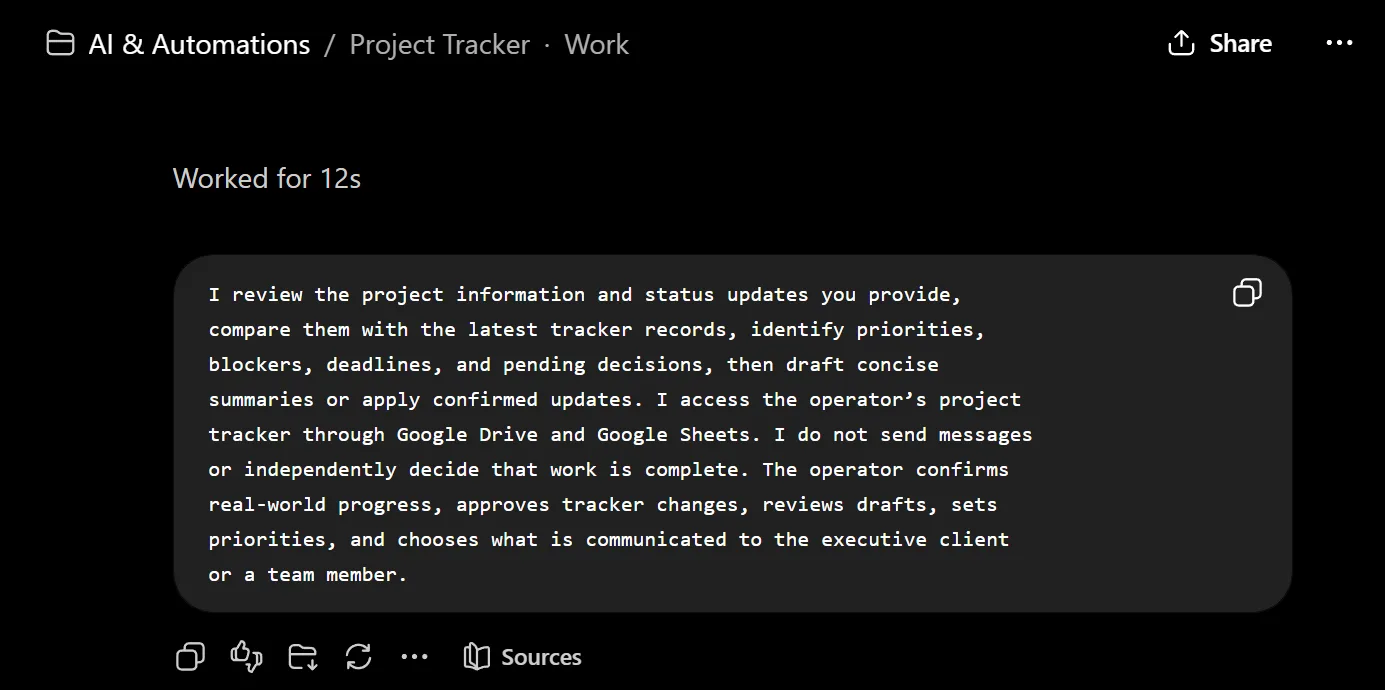
Screenshot of the assistant answering 'What do you do?' It explains that it reviews supplied project information against the latest tracker records, identifies priorities, blockers, deadlines and pending decisions, drafts summaries or applies confirmed updates through Google Drive and Sheets, and states plainly that it does not send messages or independently decide that work is complete.

Project Tracker Analyst & Update Workflow

A conversational layer over a Google Sheets operations tracker.

Boundary. Each analysis or change starts with a prompt. Drafted executive emails stay unsent. No continuous monitoring of the tracker or of third parties.

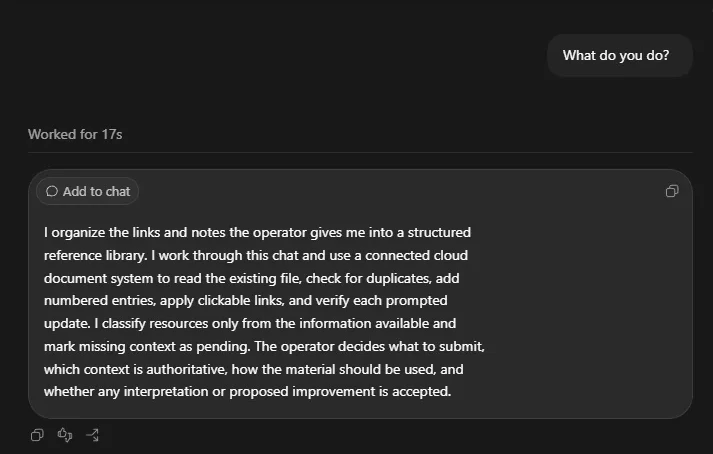
Screenshot of the assistant answering 'What do you do?' It explains that it organises the links and notes the operator provides into a structured reference library, reads the existing document to check for duplicates, adds numbered entries with clickable links and verifies each update, classifies resources only from available information and marks missing context as pending.

Reference Library & Knowledge Capture

An intake workflow that turns links and creative references shared in chat into an organised Google Docs library: duplicate-checked, sorted into the right section, numbered sequentially, hyperlinked with readable labels, and read back to verify the insert.

Boundary. Submission is manual. Content interpretation is partial. The system catalogues reliably, but doesn't yet summarise the linked source material.

How I build

  1. Map the process before automating it

    Most "automation problems" are undefined processes. I write down the current manual steps, the owners, and the failure cases first, then decide what's actually worth building.

  2. Keep a human on consequential calls

    AI drafts, ranks, and extracts. People approve anything that sends an email, changes an owner, or closes a task. Every system I ship documents exactly where that line sits.

  3. Test node by node, document what broke

    Webhook URL mismatches, payload drift, credit limits. I isolate each node, log the real failure, and write it down instead of quietly claiming a clean deploy.

What I work with

  • n8n
  • Claude
  • Google Gemini
  • Google Sheets
  • Google Docs
  • Google Drive
  • Gmail
  • HubSpot
  • Telegram
  • WhatsApp
  • Discord
  • X
  • Facebook
  • Instagram
  • JavaScript
  • Docker
  • Vercel
  • Figma
  • DaVinci Resolve

Also OpenAI, Apify, Apollo, Microsoft Outlook, Canva, CapCut and LinkedIn, plus webhooks, REST APIs, JavaScript transforms, structured outputs and human-in-the-loop review.

Experience

  1. 2026 to Oct 2026

    Operations & Automation Specialist (Executive Assistant)

    Live Digital Box

    • Worked directly with the founder of a remote multi-brand media business, turning priorities, meetings and half-formed ideas into scoped projects, documentation and automated workflows.
    • Identified the repetitive work worth automating, built it, tested it and documented it, including a 24-page operations guide and a 13-page SOP so the systems survive without me.
    • Ran structured trials of emerging AI tools, documented the actual failures rather than repeating marketing claims, and recommended against adoption where the tool didn't hold up.
    • Took a new brand from concept to live presence: founding narrative, platform graphics, ten launch posts, and a Discord community structure with roles, onboarding and ticketing.
  2. 2026 to Oct 2026

    Sales Operations & CRM Data Coordinator

    Anna Todd Coaching

    • Ran daily lead operations for a remote appointment-setting team: validated prospect data, assigned leads, monitored follow-up, and maintained CRM and Google Sheets records.
    • Rebuilt an unstructured sales process into clear lead ownership, statuses and weekly performance reporting for the founder.
    • Audited prospect information and surfaced data-quality issues before they affected follow-up or reporting.
  3. 2026

    Community Manager

    Wav Odio

    • Handled 50+ audience and customer conversations per day with organised records and timely follow-up.
    • Researched audience behaviour and competitor activity, escalating issues when needed.
  4. 2026 · present

    BS Information Technology

    Mapua Malayan Digital College

    • Specialisation in AI-Powered Product Development.
    • Senior High School, STEM, With Honors, Pamantasan ng Lungsod ng Marikina.
    • Certifications: HubSpot Inbound Sales · Xero Accounting Fundamentals · Basic Bookkeeping.

Got a process that keeps eating your week?

Tell me what the manual version looks like right now: who touches it, where it breaks, and what it costs you when it does. That's usually enough for me to say whether it's worth automating.

Email me